Treat your dev environment like a chef treats his kitchen.
A great chef doesn't cook faster by being more talented. He cooks faster because everything is already in place before the first flame is lit.
Mise en place. Everything in its place.
Knives sharpened. Ingredients prepped. Pans in reach. Spices lined up in order. The cutting board is clean before the next vegetable hits it.
A chef who has to stop mid-service to find the salt, wash a pan, or figure out which burner works is not a slow chef. He's a chef with a bad kitchen.
This post is about the developer version of that kitchen: what "walking" looks like in software, the setup I built to stop doing it, and the small daily habits that keep it from rotting.
Minimise walking
The best kitchens in the world are designed around one principle:
Minimise walking.
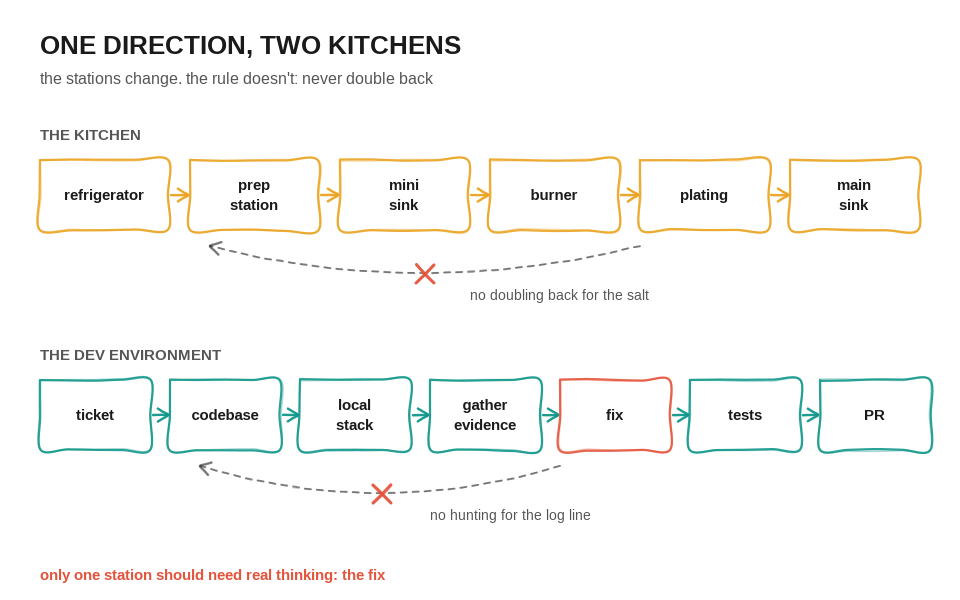
Think about a professionally designed kitchen. It flows in one direction:
Refrigerator → Prep station → Mini sink → Burner → Plating → Main sink.
You start at the fridge, pull what you need, move to the prep station right next to it, wash at the built-in sink, cook on the burner beside it, plate, and clean up at the end. You never double back. You never cross the room to find something. Every station is exactly where you need it, exactly when you need it.
That mini sink is my favourite detail. Somebody looked at a cook walking to the main sink twenty times a service, just to rinse herbs, and decided that walk was worth a whole extra piece of plumbing. That's the mindset. Not "how do I move faster between stations?" but "why is this station so far away?"
The enemy of speed in a kitchen is not slow hands. It's walking.
In software, walking is context switching
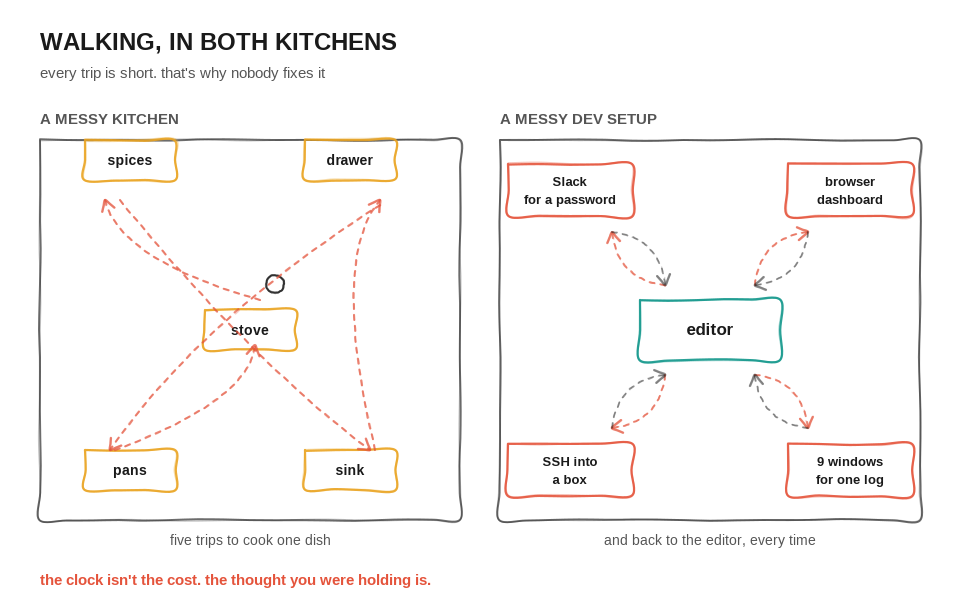
Every time you leave your editor to find a credential, that's walking. Every time you open a browser to check a dashboard that should be in your terminal, that's walking. Every time you SSH into a box to check something your local environment should already have, that's walking. Every time you alt-tab through nine windows to find the one with the error log, that's walking.
None of those trips is long. That's exactly why we don't notice them. Thirty seconds to find a password. A minute to remember which tab had the Grafana panel. Two minutes to get onto the bastion because the VPN dropped. Each one feels too small to fix.
But the clock is not the real cost. The real cost is what you were holding in your head when you left. You were three steps into a hypothesis about why a webhook fired twice, and now you're reading a Slack thread from March looking for a connection string. By the time you're back in the editor, the hypothesis has gone cold. You re-read the code. You rebuild the picture. Then you walk again.
One direction, one flow
An optimally designed dev environment works like an optimally designed kitchen. One direction. One flow:
Ticket → Codebase → Local stack → Gather Evidence → Fix → Tests → PR
You read the ticket in context (not in a browser tab you have to find). Your editor already knows the repo. The local stack is running. Logs stream where you can see them. You fix, the tests run, the PR writes itself. No backtracking. No hunting. No friction.
Each station deserves its own design:
→ Ticket. The ticket shows up next to the code, not in a tab you have to go and find. I want to read the ticket and the codebase in the same field of view.
→ Codebase. The editor already knows the repo: it's cloned, indexed, the virtualenv is active, the right Python version is the one that runs.
→ Local stack. Already up. Not "I'll start it when I need it". If the stack is the burner, the burner is lit before service.
→ Gather evidence. Logs, queries and metrics are a command away, in the terminal I'm already in. This is the station most setups forget, and it's where most of the walking happens.
→ Fix. The only station that should take real thinking.
→ Tests. They run locally against the same stack, with the same data shapes, and they're fast enough that I actually run them.
→ PR. The branch, the description and the evidence are already sitting there. The PR is plating, not cooking.
Every extra click, every extra tab, every "wait, where was that?" is walking across the kitchen mid-service.
Look at your own kitchen
Now look at your setup. How many times a day do you walk?
→ How long does it take you to go from "I just cloned the repo" to "I can run the app locally"?
→ When a production bug comes in, how many tabs do you open before you see your first log line?
→ How many times a week do you restart Docker because something got into a weird state?
→ How many credentials are you copy-pasting from Slack messages and sticky notes?
→ When was the last time your local stack matched production closely enough that a local repro actually meant something?
Be honest. Most dev environments are messy kitchens.
And we accept it. We work around it. We tell ourselves "it works on my machine" and move on. The new joiner spends their first week getting the app to boot, and we call that onboarding. The senior engineer has a private folder of scripts nobody else knows about, and we call that experience. It's neither. It's a kitchen where only one cook knows where the salt is.
My dev environment is a product
Here's what I did instead:
I treated my dev environment as a first-class product.
Not a side project. Not a "when I get time" thing. A product with requirements, maintenance and a definition of done.
Requirements means I wrote down what "working" means: the whole stack boots from cold with one command, a bug from production can be reproduced locally, a new person is productive on day one. Maintenance means it gets fixed when it breaks, the same way I'd fix a bug in the app, not worked around. Definition of done means a feature isn't finished until the local stack knows about it too.
Five things made the biggest difference.
1. One command to bring up the entire local stack.
Databases, caches, queues, the API, the admin, the background workers. One command. If it takes more than one, automate it until it doesn't.
The command itself doesn't matter. make up, just up, a shell script, a Docker Compose profile. What matters is that it's the only thing anyone needs to remember, and that it works from a fresh clone. The README that says "first install these seven things, then run these four commands in this order, then if you see this error do that" is a recipe written for a chef who has time to read during service.
2. Dev data that matches production patterns.
Not empty databases. Not "test user 1, test user 2." Real-shaped data with real edge cases. When you reproduce a bug locally, you need to see the same shapes you'd see in prod.
Real-shaped doesn't mean real. Never copy customer data onto a laptop. It means the same distributions: customers with ten years of history next to customers created yesterday, names with apostrophes and accents, accounts with a cancelled plan and a pending refund at the same time, the one tenant with forty thousand rows in a table everyone assumes is small. Those are the shapes production bugs hide in. An empty database can't reproduce anything except the happy path.
3. Credentials managed, not memorised.
Every connection string, every API key, every SSH tunnel in config. Not in your head. Not in a Slack thread from six months ago.
For a local stack that means a .env the boot script generates or pulls from a secrets manager, never one you assemble by hand. For the real environments, it means a proper secret store and named tunnels in your SSH config, so "connect to the staging database" is one command and not an archaeology project. The test is simple: could a new developer get to every environment they're allowed to see without asking anyone for a password in a DM?
4. Local monitoring that mirrors production.
If you debug with print statements locally but Grafana dashboards in prod, you're practising for a different sport than the one you play.
Run the same log format, the same structured fields, ideally the same dashboards against your local stack. When an incident comes in, you want your hands to already know where everything is. A chef doesn't use a different knife at home and a different one at work and expect the same cuts.
5. A boot script that checks health.
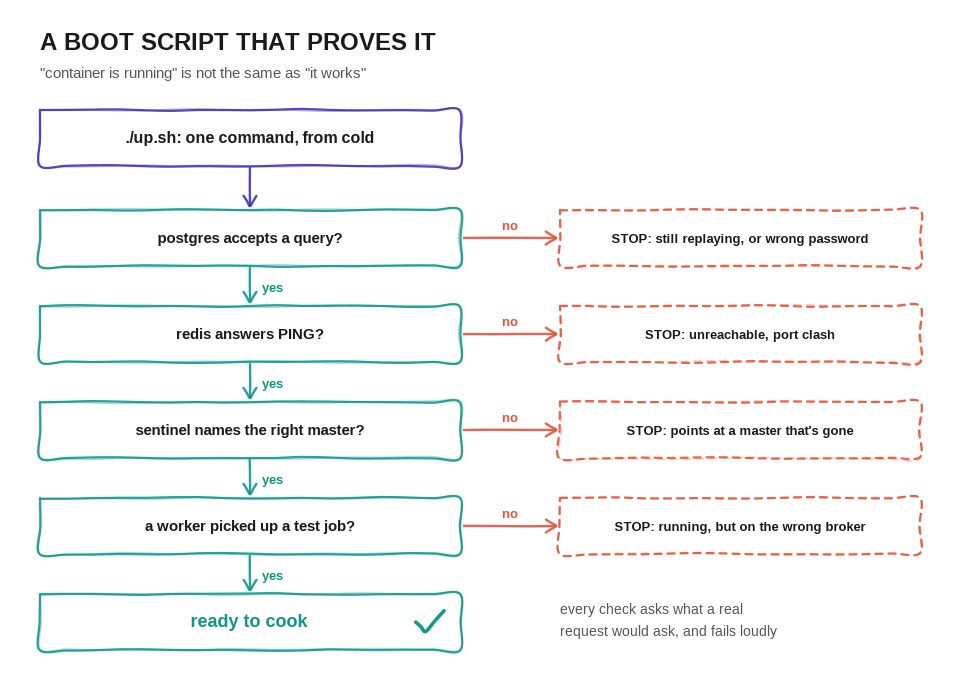
Not just "did the containers start." Did the database accept connections? Is Redis reachable? Is Sentinel pointing to the right master? Did the background workers actually pick up the queue?
"Container is running" is the most misleading green light in software. A Postgres container can be running and still replaying its startup. A worker can be running and connected to the wrong broker. A Sentinel can be running and pointing at a master that no longer exists. The boot script's job isn't to start things. It's to prove they work, and to fail loudly, with the exact reason, when they don't.
Here's roughly what that looks like. It's an illustrative sketch rather than my actual script, for a typical Django stack with Postgres, Redis behind Sentinel and Celery workers:
#!/usr/bin/env bash
# up.sh: one command, from a fresh clone to a stack that's proven healthy
set -euo pipefail

fail() { echo "BOOT FAILED: $1" >&2; exit 1; }
wait_for() {  # wait_for "<description>" <seconds> <command...>
  local what=$1 secs=$2; shift 2
  for _ in $(seq "$secs"); do "$@" >/dev/null 2>&1 && { echo "ok  $what"; return; }; sleep 1; done
  fail "$what (gave up after ${secs}s)"
}

docker compose up -d --wait

wait_for "postgres accepts queries" 60 \
  docker compose exec -T db psql -U app -d app -c "select 1"
wait_for "redis answers PING" 30 \
  docker compose exec -T redis redis-cli ping
wait_for "sentinel names the right master" 30 bash -c \
  '[ "$(docker compose exec -T sentinel redis-cli -p 26379 sentinel get-master-addr-by-name main | head -1)" = "redis" ]'

docker compose exec -T api python manage.py migrate --noinput
docker compose exec -T api python manage.py seed_dev_data --if-empty

# the real test: a worker must actually pick up a job
docker compose exec -T api python manage.py enqueue_healthcheck_job
wait_for "worker picked up the healthcheck job" 60 \
  docker compose exec -T api python manage.py healthcheck_job_done

echo "stack is ready: http://localhost:8000"
The details will differ for your stack. The pattern doesn't: every check asks a question a real request would ask, and the script refuses to say "ready" until all of them pass.
This isn't over-engineering. This is the engineering equivalent of a clean kitchen.
A fast developer doesn't type fast
Here's the part most people miss:
A fast developer isn't someone who types fast. A fast developer is someone who never has to stop and fix their environment in the middle of fixing the actual problem.
Every minute you spend fighting Docker, hunting for credentials, or wondering why your local stack doesn't match prod is a minute you're not spending on the work that matters.
And it compounds.
Five minutes of environment friction, ten times a day, fifty weeks a year. That's over 200 hours a year. Five full working weeks. Lost to a messy kitchen.
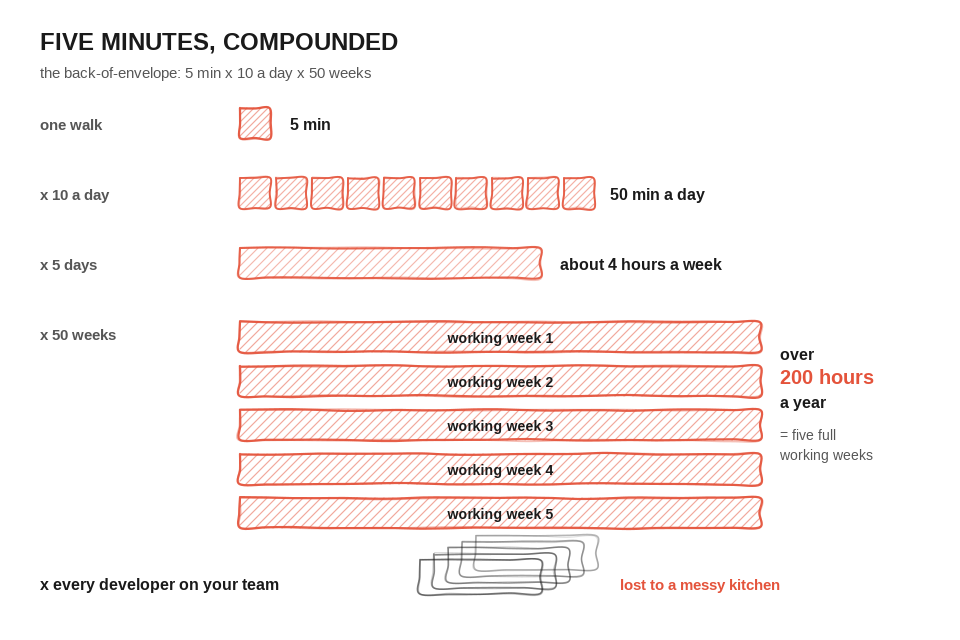
Now multiply that by every developer on your team.
And the hours aren't even the whole story. The friction tends to land at the worst possible moments: in the middle of an incident, during a tricky debugging session, when someone new is trying to get their first change out. The cost of walking is highest exactly when your head is fullest.
Clean as you go
Here's another thing chefs know:
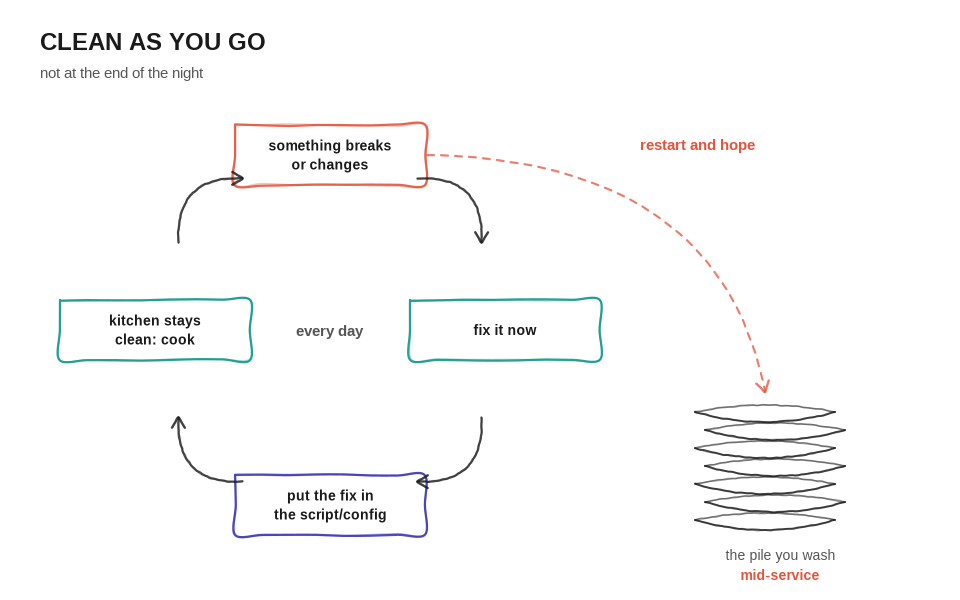
You clean as you go. Not at the end of the night.
A kitchen doesn't get messy in one go. It gets messy one unwiped board at a time. Dev environments rot the same way: one undocumented workaround, one service added to prod but not to the local stack, one config value someone tweaked on staging and never mentioned.
The dev equivalent:
→ Container acting weird? Fix it now. Don't restart and hope. A restart that "fixes" something hides a bug you'll meet again, usually at a worse time.
→ New service added to the stack? Update the boot script today. Not "when someone else needs it." The person who added it is the only one who knows what healthy looks like.
→ Config changed in prod? Mirror it locally before you forget what changed. Drift between local and prod is how a local repro stops meaning anything.
→ Something took you 20 minutes to figure out? Write it down in 2 minutes so it never costs 20 again. Better still, put it in the script so nobody has to read it.
Discipline, not equipment
The best kitchens in the world aren't impressive because of the equipment. They're impressive because of the discipline.
Same with dev environments.
You don't need a fancier laptop. You don't need more RAM. You don't need a new tool.
I've watched people buy their way out of this problem: a faster machine, a new terminal, a shiny dev-container product. Sometimes those help. But a fast laptop running a stack that needs eleven manual steps is still a messy kitchen, just with better lighting. The win comes from deciding the environment is your job, and keeping it that way every single day.
This matters even more now that a lot of my work runs through AI agents. An agent dropped into a messy kitchen walks just as much as a human, it just walks faster and gets lost more confidently. Give it one command to boot, health checks that say what's wrong, and logs in the terminal, and it can go from ticket to PR without asking me where the salt is.
You need everything in its place, ready to go, before the ticket lands.
Mise en place. For developers.
How long does your local stack take to boot from cold? Be honest.